The next generation of digital banking from Queensborough is designed with you in mind.
In today’s fast-paced digital world, your banking experience should feel as intuitive, sleek, and personalized as the rest of your online life. That’s why we’re excited to roll out our new online and mobile banking experience.
We've put digital first with a full redesign of our online and mobile platforms, bringing enhanced functionality, personalized features, and modern design all together in one powerful experience.
What’s New?
Here’s a peek at our new digital banking platform:
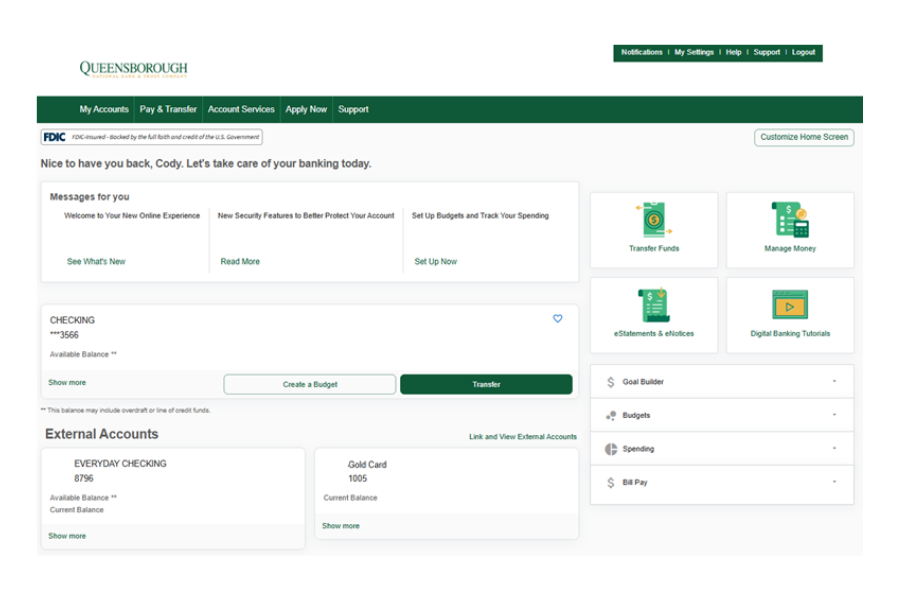
Fresh, Modern Look & Feel
Our redesigned web and mobile platforms feature a clean, contemporary design that enhances ease of use and overall navigation with the introduction of widgets and quick actions.
User-Level Customizations
Take control of your dashboard with customizable options:
- Set your greeting name
- Reorder, hide or nickname your accounts
- Customize your screen layout to display the tools you want most
- Tag favorite accounts and group them for quick access
Improved Account Details
The new Account Details popout provides deeper insights and a more intuitive layout, giving you quicker and clearer access to the financial information you need.
Specifically, our retail users will enjoy features like:
Smarter Payments & Transfers
Our all-in-one Pay & Transfer hub simplifies money movement with a central place to manage your payments, transfers, and more — making your financial life easier to navigate.
Better Communication Tools
Need help or support? With integrated Glia-powered communication, you can choose how you connect with us whether that’s via chat, voice, or video. Help is now faster, more flexible, and more convenient. Check it out today from the ‘More’ menu.
Built-In Money Management
Stay in control of your finances with our powerful money management tools. Money Management offers an easy to use, highly visual experience to create a 360-degree view of internal and external accounts which help you make more informed financial decisions.
- Accounts: See a single view of internal accounts, and external accounts.
- Transactions: View all transactions and filter by account, date, category, keyword, or amount.
- Spending: Review spending categories with drill downs into subcategories and transactions.
- Budgets: Auto-generate budgets based off past spending habits or create custom budget categories.
- Trends: Track spending and income over time with subcategories that include transaction details.
- Net Worth: Evaluate if overall net worth is trending up or down with monthly drill downs.
- Debt Management: Project debt payoff dates and prioritize the completion of certain debts.
- Goals: Create goals and associate them with a specific account and timeline.
- Alerts: Define alert thresholds by account and alert type.
Keeping You Protected
We’ve enhanced measures to make sure you’re safe.
- Password Requirements
- When changing your password, new requirements must be met.
- Passwords will require a minimum of:
- 1 lowercase letter
- 1 uppercase letter
- 1 special character
- 1 number
- 14 characters with a maximum of 32 characters
- Time-Based One-Time Passcode
- This new feature allows you to utilize an authenticator app like Google Authenticator or Microsoft Authenticator to complete the Multi-Factor Authentication (MFA) process, rather than receiving a call, text, or email.
- Upon your next log in, a prompt will appear to turn on this feature. Alternatively, you can always enable it from My Settings within Digital Banking.
From smarter design to more powerful tools, our new platform is designed to make managing your money easier, faster, and more intuitive. We’re excited about what’s ahead and can’t wait for you to experience it.
DOWNLOAD THE MOBILE APP TODAY